Journey templates
Journey templates give you a pre-built starting point for common communication flows. Instead of building a journey from scratch, you can select a template, adjust the settings for your use case, and launch faster.
Templates are available on the Templates tab of the Journeys page (Automation Studio > Journeys > Templates).
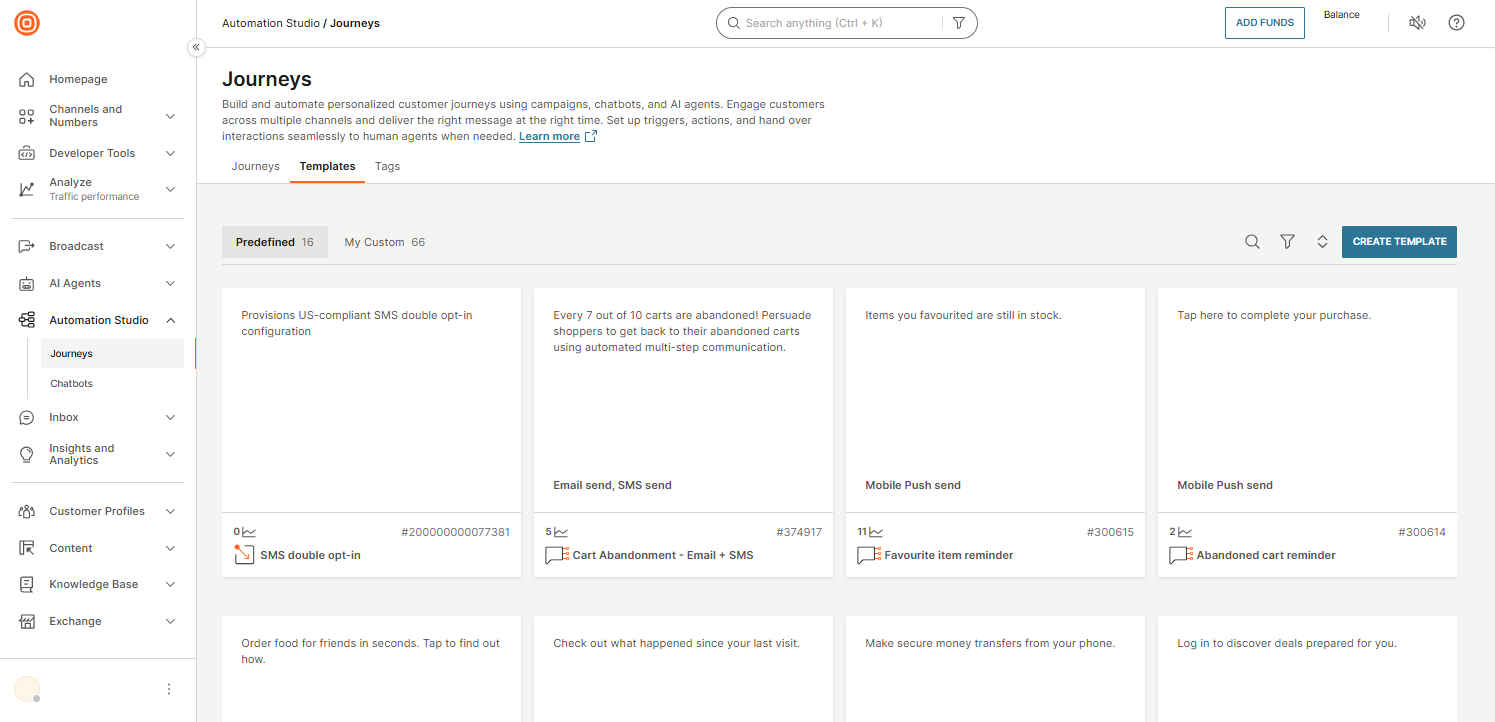
Template types
The Templates tab has two sub-tabs:
| Tab | Description |
|---|---|
| Predefined | Ready-made templates created by Infobip for common use cases such as cart abandonment, re-engagement, and onboarding. |
| My Custom | Templates you have saved from your own journeys or created from scratch for reuse across your team. |
Each template card shows a message preview, the channels used (for example, Mobile Push send or Email send, SMS send), the usage count, and the template ID.
Actions
The following actions are available on the Templates tab:
- Create Template: Build a new custom template from scratch.
- Search: Find a template by name or ID.
- Filter: Filter templates by tags.
- Sort: Change the display order of templates.
When you hover over a template card, the available actions depend on the template type:
| Action | Predefined | Custom |
|---|---|---|
| Use | ✓ | ✓ |
| Duplicate | ✓ | |
| Edit | ✓ |
Custom templates also have a checkbox for bulk selection and a three-dot menu (⋮) for additional actions such as Delete and Manage tags.