Enable Marketing Messages API for WhatsApp
Marketing Messages API for WhatsApp is enabled when you register a WhatsApp sender. The enrollment applies to your whole Meta business portfolio, including all WhatsApp Business Accounts (WABAs) in it.
Enabling Marketing Messages API for WhatsApp ensures that your outbound marketing templates are routed through Meta's optimized delivery system, while all other message types continue to use Cloud API.
Requirements
-
WhatsApp Business Account (WABA):
 must be active and not restricted for policy violations.
 cannot be an On-Behalf-Of (OBO) account. If it is, migrate to a shared WABA.
-
Your business country and phone number country must be in a region where Marketing Messages API for WhatsApp is available.
-
You must accept the Marketing Messages API for WhatsApp Terms of Service during the embedded signup process on our web interface.
How to enable Marketing Messages API for WhatsApp
How you enable Marketing Messages API for WhatsApp depends on whether you already have registered senders.
New senders: When you register a WhatsApp sender, you confirm that marketing messages will be sent through Marketing Messages API for WhatsApp, and your business is onboarded during the signup. No separate step is required.
Existing senders: Infobip enables Marketing Messages API for WhatsApp for your WhatsApp Business Accounts by default. To start using it, you need to accept Meta's Marketing Messages API for WhatsApp Terms of Service once for your business portfolio. Until you accept them, your marketing messages continue to be sent through Cloud API, without any disruption.
You can accept the terms in one of the following ways.
Register your sender again in the Infobip web interface
- In the web interface, go to Channels and Numbers > Channels > WhatsApp and select Register sender.
- In the What you'll need dialog, select Continue.
- Select Connect a number you already have > Connect a number you have outside of Infobip.
- Select both checkboxes, including I understand marketing messages will be sent via the Marketing Messages API after signup, and select Login With Facebook.
- In the Meta pop-up window, on the Add your WhatsApp phone number screen, select a number that is already registered in the WhatsApp Business Account you want to onboard.
- Complete the remaining steps. See Complete the signup in Meta.
Accept the terms in WhatsApp Manager
Someone with full control of your business portfolio must accept the terms.
- In WhatsApp Manager, go to Overview.
- In the Alerts section, select Accept terms to get started for Marketing Messages API for WhatsApp.
- Complete the steps to accept the Terms of Service.
Ask Infobip to send the onboarding request
Contact your account manager or Support. Infobip sends an onboarding request to Meta, and the admins of your business portfolio receive an email from Meta with a form to accept the terms.
Once you enroll your WABAs into Marketing Messages API for WhatsApp, no further configuration is required. Marketing traffic will be automatically routed through MM API whenever possible.
Allow up to 15 minutes for configuration to synchronize before sending messages, as attempts during this period may result in delivery errors.
Marketing Messages API for WhatsApp enrollment is performed at the Meta business portfolio level and covers all WABAs in that portfolio. Existing phone numbers remain registered on Cloud API and are now eligible to use Marketing Messages API for WhatsApp in addition to Cloud API for sending marketing messages.
When you enable Marketing Messages API for WhatsApp for your Meta business portfolio, a read-only ad account is created to mirror marketing templates under that portfolio. This account is kept in sync with changes to templates. However, the synchronization may take some time, so it is best to wait at least 15 minutes after creating or updating a template to ensure the mirrored ad entity reflects those changes.
Enable On-Behalf-Of (OBO) WABAs for Marketing Messages API for WhatsApp [#enable-on-behalf-of-obo-wabas-for-mm-lite-api-how-to-enable-mm-lite-api]
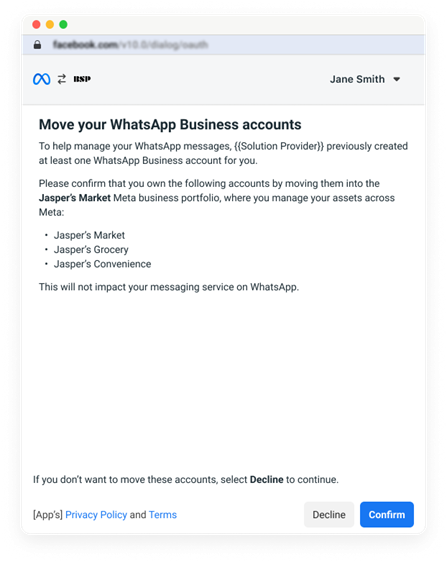
Marketing Messages API for WhatsApp does not support Meta business portfolios containing WABAs that were created using the On-Behalf-Of (OBO) model. If the selected business portfolio contains any OBO WABAs, they will be migrated to shared WABAs(opens in new tab). Mirrored read-only ad accounts and entities will be created for each WABA and marketing template under the enrolled business portfolio.
The remainder of the flow is the same: review and acknowledge the permissions granted to Infobip to complete the sender registration process and enable Marketing Messages API for WhatsApp.
Optimize and track with MM Lite
Configure TTL, conversion tracking, creative optimization, and deep links.
Max price
Set a maximum bid for marketing templates and estimate delivery and cost.
WhatsApp message templates
Create and manage marketing templates for your campaigns.
Was this page helpful?