Short Message Service (SMS)
Short Message Service (SMS) is a reliable way to reach customers anywhere in the world. It does not require internet connectivity, is compatible with all mobile devices, and is ideal for two-factor authentication ↗, notifications, and customer engagement.
The following diagram shows the SMS message flow from sender to recipient.
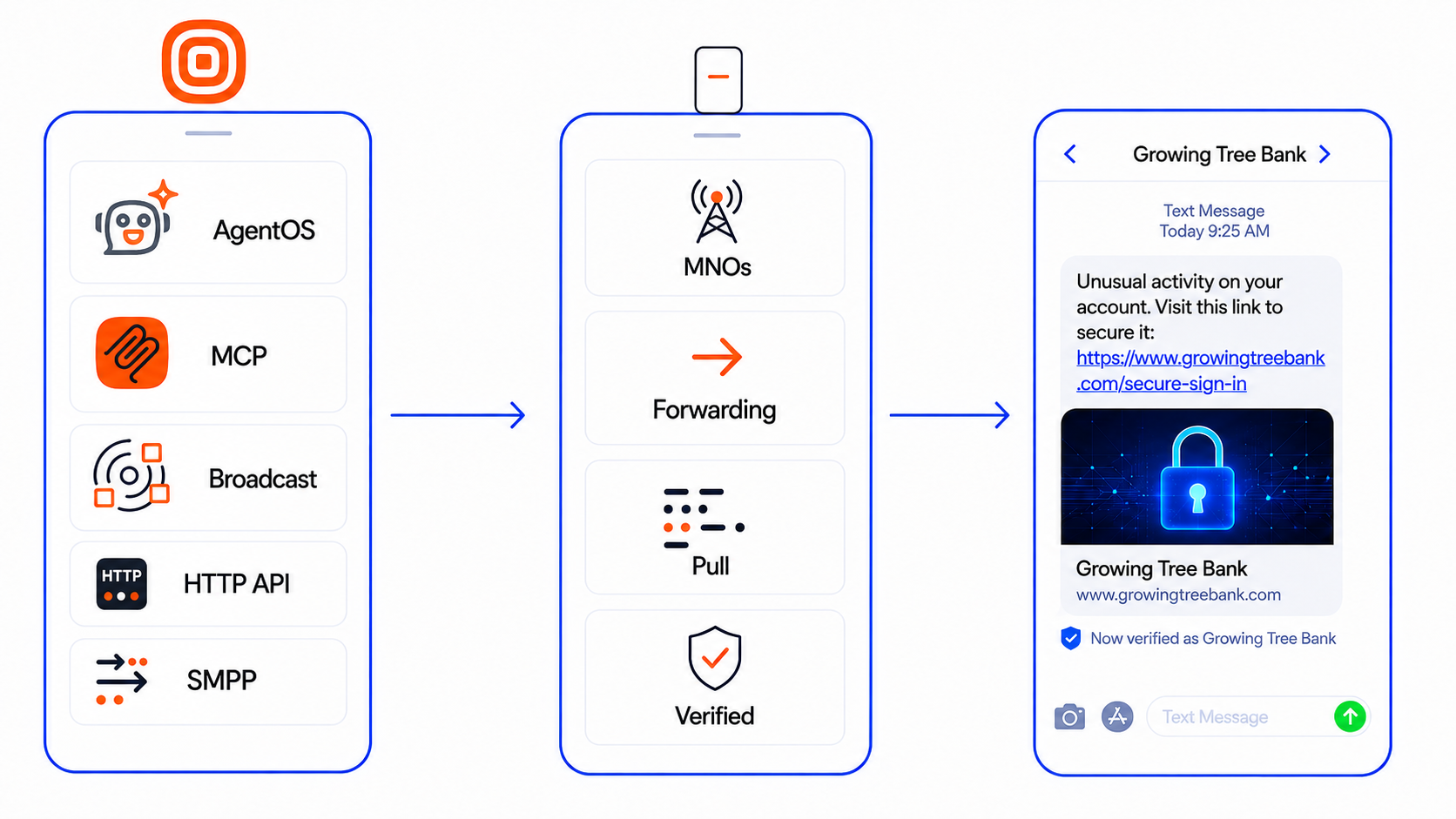
SMS requires signal coverage for messages to be delivered. If a user is out of range, messages are stored for up to 48 hours and are delivered when coverage is restored. Standard SMS messages hold up to 160 characters (or 70 characters if Unicode). When more characters are used, messages are split into parts and reassembled on the recipient's device. SMS handles text characters only.
Try out SMS with Infobip [#try-out-sms]
Start exploring SMS for business. Use your free trial, and in just a few steps, you can send your first message and test key features.
To start sending messages in a live environment, you will need to set up an SMS sender. This can be a phone number (long number or short code) or an alphanumeric sender ID that your business uses to communicate with customers.

Ready to send your first message?
Follow our step-by-step guide to send your first SMS message.

Need to set up your sender?
Learn about SMS senders and how to submit a request for SMS senders.

Communication options
Understand one-way, two-way, inbound SMS, and transactional vs promotional messaging.

Send and track
Learn about sending options, scheduling, URL tracking, and delivery reports.

SMS compliance
Learn more about compliance and regulations and best practice. Check global coverage in the SMS coverage and connectivity reference.
Use SMS with Infobip solutions [#use-sms-with-infobip-solutions]
Infobip offers multiple ways to send SMS, from direct API integration to no-code solutions. Choose the approach that fits your use case and technical environment.
| Solution | Best for |
|---|---|
| Programmatic | |
 SMS API SMS API | Full control, bulk messaging, scheduling, delivery reports |
| Messages API | Multi-channel messaging, failover between channels |
| 2FA API | One-time passwords, PIN verification, authentication flows |
| MCP server | AI-powered workflows, prompt-based messaging |
 Infobip SDKs Infobip SDKs | Backend integration (PHP, Java, Python, C#) |
| Infobip products | |
 Broadcast Broadcast | One-time campaigns, bulk notifications, scheduling |
 Journeys Journeys | Automated journeys, event-driven flows, failover |
 Inbox Inbox | Agent-assisted support, real-time chat |
 Chatbots Chatbots | Chatbot automation, keyword-based responses |
| Third-party ecosystem | |
| Integrations | Use Infobip messaging capabilities directly within external platforms like Salesforce, HubSpot, Zapier, and others. |
Journeys, Inbox, and Chatbots are part of AgentOS, the unified Infobip product for new accounts. Existing accounts using Moments, Conversations, or Answers can upgrade to AgentOS at any time.
Audience targeting and segmentation is managed through People, which integrates with Broadcast and Moments.
Multi-tenant SMS at scale [#multi-tenant-sms]
If you manage SMS communication for multiple customers, brands, or business units from a single account, see CPaaS X. CPaaS X provides multi-tenant isolation, automated onboarding, per-customer tracking, and intelligent sender selection, built for platforms, communication service providers, and agencies serving multiple clients. Each tenant gets isolated sender pools and reporting, so end customers never see the traffic or configuration of other tenants.
Developer tools and APIs [#developer-resources]
Explore the Infobip APIs to send messages programmatically, receive replies in real time, and integrate SMS into your systems.

Features [#features]
Message handling
SMS supports standard text messages, Flash SMS, inbound MO messages, and binary SMS for specialized payloads. See Send and track, Communication options, and Binary SMS API.

Routing & connectivity
Check how SMS is delivered across Infobip's global network and review country-specific sender rules, registration requirements, and restrictions in SMS coverage and connectivity.
Delivery & reliability
Track delivery with webhooks or polling, use validity periods, and monitor conversion tracking and reporting. See Send and track and Reports and insights.
Sender management
Choose the right sender type: VLN, short code, 10DLC, toll-free, or alphanumeric sender IDs. See Numbers and senders and Resources and numbers.

Personalization & content
Use GSM-7, Unicode, transliteration, URL shortening, branded domains, and conversion tracking to tailor messages and measure engagement. See Multilingual SMS and Send and track.
Compliance & security
Handle opt-in/out, sender registration, and local requirements such as DLT, IYS, 10DLC, and sending windows. See Compliance guidelines and SMS coverage and connectivity.
Feature comparison by solution [#feature-comparison]
The following table shows which SMS features are available in each Infobip solution. If you use Infobip SDKs or MCP, feature availability matches the SMS API.
For third-party integrations, feature availability varies by integration. See the Integrations documentation to check feature support for your specific integration.
| Feature | SMS API | Messages API | Broadcast | Journeys | Chatbots | Inbox |
|---|---|---|---|---|---|---|
| Core messaging | ||||||
| Single message sending |  | | | | | |
| Bulk message sending | | | | |  | |
| Inbound SMS (two-way) | | | | | | |
| Content and customization | ||||||
| Personalization with variable substitution | | | | | | |
| Link shortening | | | | | | |
| Flash SMS | | | | | | |
| Message format preview | | | | | | |
| Multilingual and special characters | | | | | | |
| Delivery | ||||||
| Scheduling | | | | | | |
| Delivery time windows | | | | | | |
| Message validity period | | | | | | |
| Send speed limiting | | | | | | |
| Analytics and reporting | ||||||
| Delivery reports | | | | | | |
| Campaign tracking* | | | | | | |
| Click tracking (shortened links) | | | | | | |
| Compliance | ||||||
| India DLT | | | | | | |
| Turkey IYS | | | | | | |
| South Korea LMS | | | | | | |
* Campaign tracking works differently depending on the interface. In the API, you set a campaignReferenceId in the request to group messages for reporting. In the web interface, campaigns are tracked through solution-specific dimensions such as Broadcast campaigns, Moments flows, or journeys.
For details on character encoding, National Language Identifier (NLI), and transliteration options, see Multilingual SMS.
Additional resources [#additional-resources]
Explore more tools and documentation to help you plan, integrate, and support your SMS use case.

Essentials
Browse foundational guides for creating an account, managing users, setting up APIs, and ensuring connectivity in the Essentials hub.

Pricing
Estimate your messaging costs with our interactive pricing calculator ↗. Select SMS and choose your country to see current rates.

Support center
Browse troubleshooting guides and frequently asked questions in the Support center ↗.

Use case library
Explore real-world examples in our Use case library ↗ to inspire your implementation.