Applications and entities
CPaaS X organizes multi-tenant communications around two independent building blocks: applications and entities. This page explains what each concept represents, how they work together, and how they are created and managed.
An application represents an environment or use case, like "production SMS" or "marketing campaigns." An entity is a tenant, a customer, brand, or business unit whose traffic and data stay completely separate from every other entity. You combine the two: applications organize what you are doing, entities organize who you are doing it for.
Two core concepts [#two-core-concepts]
Applications [#applications-two-core-concepts]
An application represents an environment or use case within your account, such as a production system, a marketing program, or a testing setup. You can create multiple applications to match your organizational structure.
Each application gives you:
- A unique
applicationIdidentifier under your control. - Independent reporting and usage tracking.
Examples of applications:
production: Live customer communicationsmarketing-campaigns: All marketing outreachstaging: Pre-production testing environment
Organizational patterns:
Applications can be organized in multiple ways depending on your business needs:
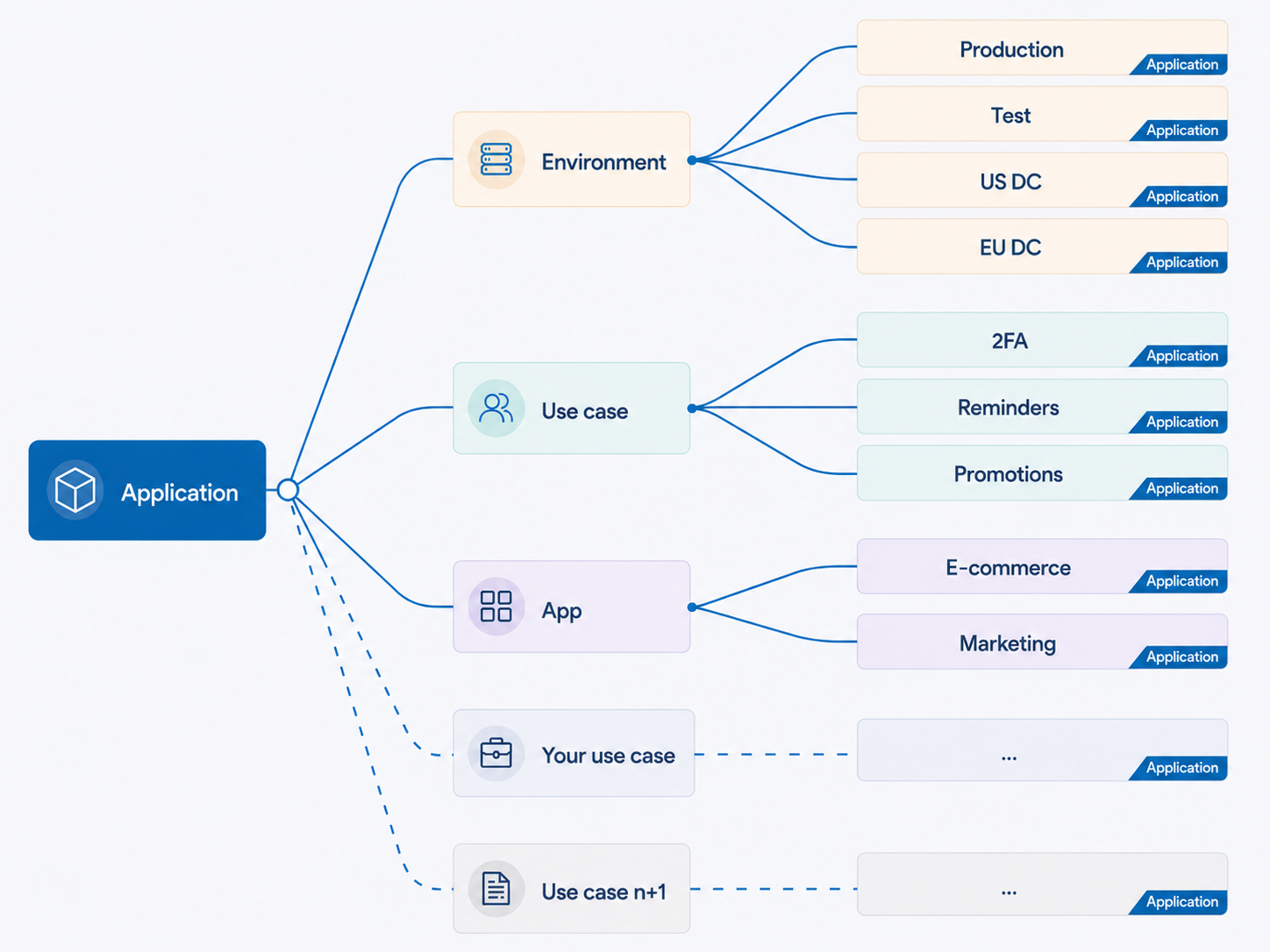
- By environment: Separate applications for
production,staging, andtesting. - By use case: Group by communication purpose (
authentication,notifications,marketing). - By geography: Create per region or data center (
us-datacenter,eu-datacenter). - Custom patterns: Combine any of these or create your own structure.
Key point: Applications are independent. What happens in one application does not affect a different application.
For technical reasons, a default application is automatically created when your Infobip account is set up. While you do not need to explicitly use the default application, it appears in your applications list and API responses. You can create additional applications as needed for your business requirements.
Entities [#entities-two-core-concepts]
An entity is your tenant. It represents a customer, business unit, or organizational division within your account, such as a specific client, a regional office, or a product tier.
Key characteristics:
- Created independently. No application assignment required during creation.
- If no application is specified when sending, the entity is tagged with the
defaultapplication. - Connected to applications through sending strategies and message sending API calls.
- No hard limit on creation. Safeguards prevent abuse.
- Completely isolated from other entities with separate data and usage tracking.
What each entity gives you:
- A unique
entityIdidentifier under your control. - Independent reporting and usage tracking.
- Complete data isolation from other entities.
Examples of entities:
- Individual customer accounts (
customer-a,customer-b) - Business divisions (
division-northamerica,division-europe) - Product tiers (
tier-premium,tier-standard)
Organizational patterns:
Common entity structures include:
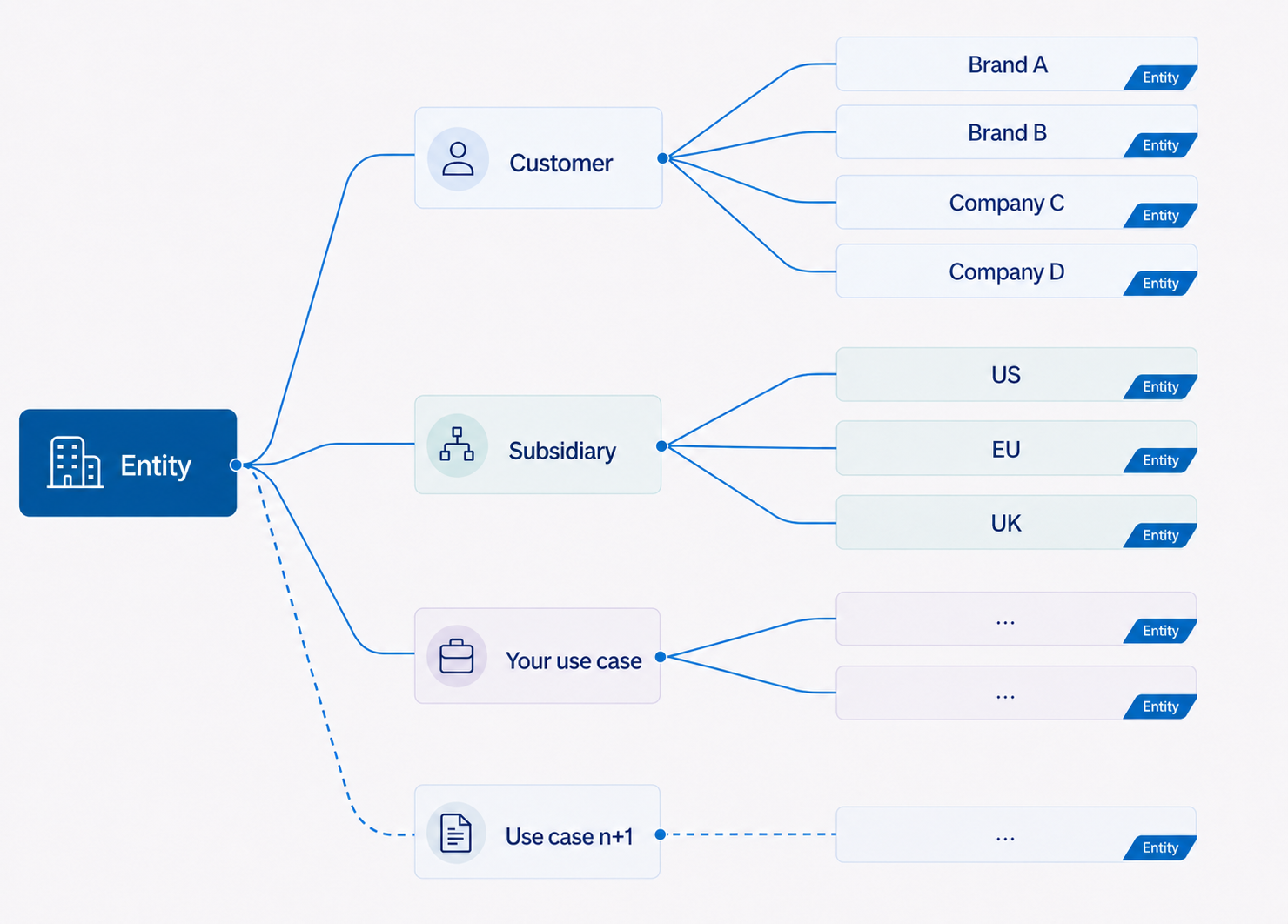
- By customer: Each customer or brand as a separate entity (
customer-a,customer-b,company-c). - By geography/subsidiary: Regional offices or business subsidiaries (
office-us,office-eu,office-uk). - By business unit: Internal departments or business lines (
marketing-team,support-team).
Key point: Entities are completely isolated. Each entity can only see its own data.
How applications and entities work together [#how-applications-and-entities-work-together]
Applications and entities share several operational characteristics:
| Capability | How it works |
|---|---|
| Reporting | Both applicationId and entityId appear in delivery reports and callback events for tracking by application and entity. |
| Smart routing | Use sending strategies and resource associations together to configure routing rules that pair applications and entities with resources. |
| API key scoping | API keys can be optionally scoped to specific application+entity combinations for extra separation and protection. |
| Data isolation | Complete separation between applications and entities, with independent usage tracking and reporting. |
Creation and management [#creation-and-management]
You can create applications and entities through the web interface, API, or MCP servers. Each requires a unique ID that cannot be changed after creation, plus an optional display name.
- Web interface and API: See Manage applications and entities for step-by-step instructions.
- MCP servers: See Infobip MCP documentation and GitHub repository ↗ for programmatic flows.
Additionally, entities can be automatically created during API calls. When you send a message with an entityId that does not exist, it is automatically created with safeguards. See Automatic creation with safeguards.
Both applications and entities preserve all historical data, so you can reorganize your structure as needed.
Automatic creation with safeguards [#automatic-creation-creation-and-management]
You do not need to pre-create all entities before using them. When you send a message with an entityId that does not exist, CPaaS X automatically creates it:
- New entity is created with that
entityId. - Entity is tagged with the
defaultapplication if no application is specified. - Entity identifiers appear in reporting and analytics immediately.
Applications must be created explicitly through the web interface, API, or MCP servers. If you send a message with an applicationId that does not exist, the message is rejected.
Automatic creation includes safeguards to prevent accidental creation of excessive identifiers, malicious attempts to flood your account structure, and uncontrolled proliferation of unused entities. For production systems, use explicit API or web interface creation. Automatic creation works best for dynamic, customer-specific entities during development.
Manage applications and entities
Step-by-step instructions for creating, updating, and deleting.
Get started with CPaaS X
End-to-end setup tutorial.
Understanding resources
Resource types, lifecycle, and billing.
Sending strategies
Resource associations and intelligent routing.
Secure your CPaaS X setup
API keys and security best practices.