Understand WebRTC
Infobip WebRTC (Web Real-Time Communication) offers offers seamless communication with a robust suite of SDKs and APIs designed to empower audio and video interactions in real-time.
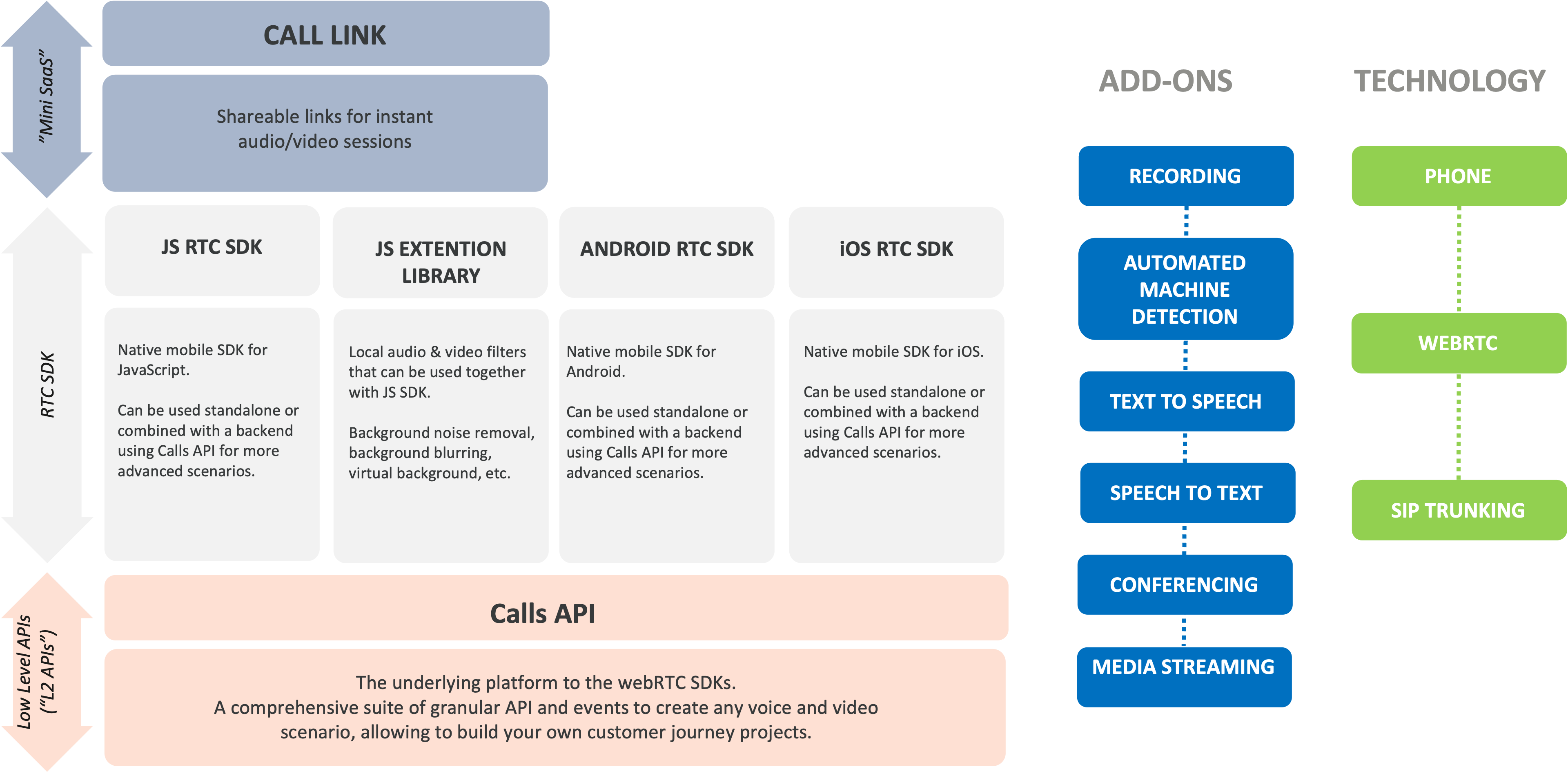
Developers can leverage the flexibility of the Infobip native mobile SDKs for JavaScript, Android, and iOS, which are adept for building both standalone applications and those combined with backend services through the Calls API for advanced functionality. With the exceptions of conferencing and recording, most of the Infobip add-ons harness their full potential only when webRTC is used in conjunction with a customer application developed on the Calls API platform. This combination unlocks powerful capabilities, enhancing user experiences with features like media streaming, speech synthesis, and recognition interactions, or advanced conference participants control.
Call Link simplifies the integration of WebRTC technology into business operations, enabling voice and video communication. Call Link is particularly beneficial for companies looking to integrate WebRTC into their workflows without the complexity of integrating the entire WebRTC technology stack. Through the Infobip web interface or API, businesses can generate a short URL that, when clicked by the end user, opens a browser window and establishes a connection to a predefined destination. Call Link can also be used to create instant meeting rooms that multiple participants can join over the same shared link. Additionally, businesses can brand the browser window with customized elements like text, colors, and logos. While the Call Link can be fully managed through API integration, Call Link is also user-friendly for business users via the Infobip web interface, which allows for easy creation and configuration.
In summary, you can use WebRTC as:
- Embedded technology in your web or mobile application - WebRTC is implemented in applications using the RTC SDKs.
- Easy link to share with end users - Infobip Call Link makes it easy to share links over email, messaging, or websites for users to get instantly connected to your support agents without the need for you to create an end-user application.
- Embedded technology in Conversations, our Contact Center as a Service solution - you do not need to care about SDKs, WebRTC is part of the web interface used by Conversations agents.
WebRTC supports multiple connectivity scenarios:
| Number of parties | Connection scenario | Example use case | What you will need |
|---|---|---|---|
| Single-party calls | Web (or mobile app) to application and vice-versa | IVR served over WebRTC; voice messaging to WebRTC users | Combined use of WebRTC SDK and Calls API |
| 2-party calls | Web (or mobile app) to web (or mobile app) | One to one call between two individuals, such as an end user with a support agent | WebRTC SDK or Call Link with WebRTC SDK |
| Web (or mobile app) to phone | End user calls a business phone number found on that business' website | WebRTC SDK or Call Link, setting phone destination | |
| Phone to web (or mobile app) | End user calls a business number, where the call gets redirected to a WebRTC user | Combined use of WebRTC SDK and Calls API | |
| Multi-party calls | Only with WebRTC users, joining the same WebRTC Room | Conference calling | WebRTC SDK (Rooms methods) or Call Link with ROOM destination |
| Only with WebRTC users, with finer-grained control over participants | Advanced conference calling | Combined use of WebRTC SDK and Calls API | |
| WebRTC users connecting with other types of endpoints (phone, SIP, etc.) | Crisis centers, advanced conference calling, and call centers with offsite experts joining | Combined use of WebRTC SDK and Calls API |
WebRTC calls and Rooms can be recorded. Recordings are available as an add-on. Contact your dedicated Account Manager to set it up. To learn more about recordings, see Recording.
Certain types of Voice and WebRTC calls and call recordings may be subject to specific country regulations. Before you set up and start using Voice and WebRTC, check the country's telecom regulations.
In this section
- Configure WebRTC features: SDK feature support matrix, network events, recording, screen capture, data channels, broadcast, inter-region communications, and technical requirements.
- Get started with RTC SDK: Declare a WebRTC application, set up the RTC SDK, and explore advanced scenarios.
- Use Call Link: Generate and configure Call Link URLs for voice and video communication without developing an end-user application.