Speech to speech
Voice AI agents is available as an Early Access feature. To get access or learn more, contact your dedicated account manager or Support.
If you selected Speech to speech, configure the following fields.
Voice processing
Set the model and voice the agent uses to respond, and adjust the speech rate and noise reduction:
- Model: Select the model for responses. You may choose from Realtime models, both full and mini versions.
- Voice: This is a mandatory field. Select the voice the model uses for responses.
- Speed: Set the speech rate. The default value is 1.00.
- Noise reduction: This is a mandatory field. Select the type of noise reduction. Use Near field for close-talking microphones (such as a phone call or headphones) and Far field for microphones used at a distance (such as a mobile speakerphone or conference room setups).
Turn detection
Choose how the agent detects when the speaker has finished talking. Select Server voice activity detection or Semantic voice activity detection, then configure the fields for your choice.
Server voice activity detection
Uses server-side voice activity detection to detect when the user has finished speaking. The model monitors audio levels and measures silence duration, then adjusts the response timeout based on the probability that the user has finished speaking. Use this when you need predictable, configurable control over how silence is interpreted.
Configure the following fields:
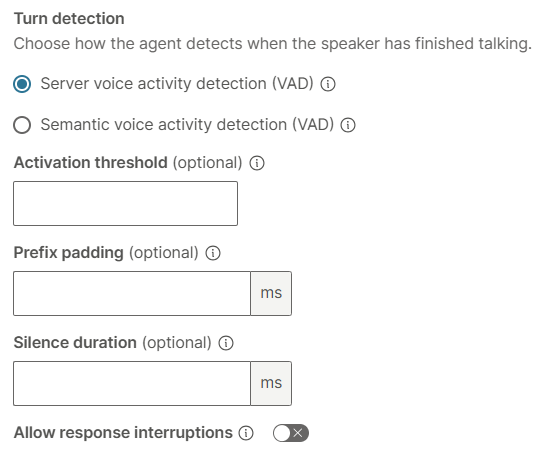
- Activation threshold (optional): Set the sensitivity of voice activity detection, on a scale from 0.0 to 1.0. Higher values require louder audio to register as speech, which reduces false triggers in noisy environments. Lower values increase sensitivity and are better suited for quiet settings or soft-spoken users.
- Prefix padding (optional): Prefix padding solves speech clipping. Because VAD requires time to detect that speech has started, the first milliseconds of audio are lost before detection triggers. Prefix padding rewinds the audio buffer slightly to recapture that pre-detection audio, so the model receives the complete utterance from its actual start. The value is in milliseconds.
- Silence duration (optional): Set how many milliseconds of continuous silence must occur before speech is considered finished. Lower values cause the agent to respond faster but increase the risk of interrupting natural mid-sentence pauses. For noisy environments or when users need more time to complete a thought, use 700 to 1000 ms. For a faster, more responsive experience, use 200 to 400 ms.
- Allow response interruptions: When enabled, the AI stops its current response if the user starts speaking again.
Semantic voice activity detection
Uses semantic analysis to detect when the user has finished speaking. The model evaluates whether the user's words form a complete thought and adjusts the response timeout based on that probability. This approach is more resistant to background noise and less likely to cut off users during natural mid-sentence pauses.
Configure the following fields:

- Eagerness (optional): Control how quickly the agent responds after the user has finished speaking. High responds immediately when a probable end of speech occurs. Low waits longer to confirm the user has finished, reducing the chance of the agent interrupting mid-thought. Medium is the default.
- Allow response interruptions: When enabled, the AI stops its current response if the user starts speaking again.
Input transcription
Set how the caller's speech is transcribed, including the transcription model and language.
Configure the following fields:
-
Prompt (optional): Enter a text string to bias the transcription model toward the vocabulary, spelling, and phrasing expected in your conversation. This field functions as a hint to the recognition engine only. It influences how audio is decoded into text but does not change the conversational behavior of the model. Use it for terms the model might mishear or transcribe inconsistently, such as proper nouns, acronyms, and domain-specific language.
-
Model (optional): Select the model used to transcribe the end user's speech:
Model Description Use case GPT 4.0 Transcribe Built on the GPT-4o architecture. Delivers a low word error rate, particularly for accented speech, overlapping audio, and complex vocabulary. Use for the lowest word error rate when accuracy is the priority. For example, when handling accented speech, technical vocabulary, or poor audio quality. GPT 4.0 Mini Transcribe A lighter, faster variant of GPT 4.0 Transcribe. Latency is reduced and cost is lower than GPT 4.0 Transcribe. Accuracy is lower than the full model. Offers the best balance of speed and cost for high-volume deployments. Use when latency per turn directly affects conversation quality. NOTEFor the best experience, use GPT 4.0 Mini Transcribe. -
User language (optional): The language of the input audio.
Inactivity handling
Use these settings to control what the agent does when the caller stops responding. After a period of silence, the agent sends a re-engagement prompt to keep the conversation moving. If the caller stays silent after the configured number of retries, the agent ends the call or returns control to the journey.
Configure the following fields:
- Timeout: Set how many milliseconds of caller silence to allow before the agent sends a re-engagement prompt. Tune this against your normal round-trip latency so the prompt does not fire while the caller is still waiting on a response.
- Retries after timeout: Select how many times the agent re-engages a silent caller before it ends the call or returns to the journey.
After configuring all the fields, select the check mark to validate your input.
Additional resources
 Set up an inbound Voice AI agent
 Set up an outbound Voice AI agent
Transfer call to AI agent: Get started
Hand over an active call from the IVR flow to a real-time Voice AI agent.
Speech to text to speech
Configure voice settings, transcription, inactivity handling, and silence settings for a Speech to text to speech agent.
Manage call session outcomes
Handle what happens after the call session ends using the element branches.
Prepare Voice AI agent for launch
Write voice prompts, verify your setup, and test before going live.
Was this page helpful?