Subscription hierarchy and deletion rules
Subscriptions are part of a system of interconnected components. Understanding this hierarchy helps you avoid configuration errors, manage dependencies, and plan what you can safely delete.
Component hierarchy [#component-hierarchy]
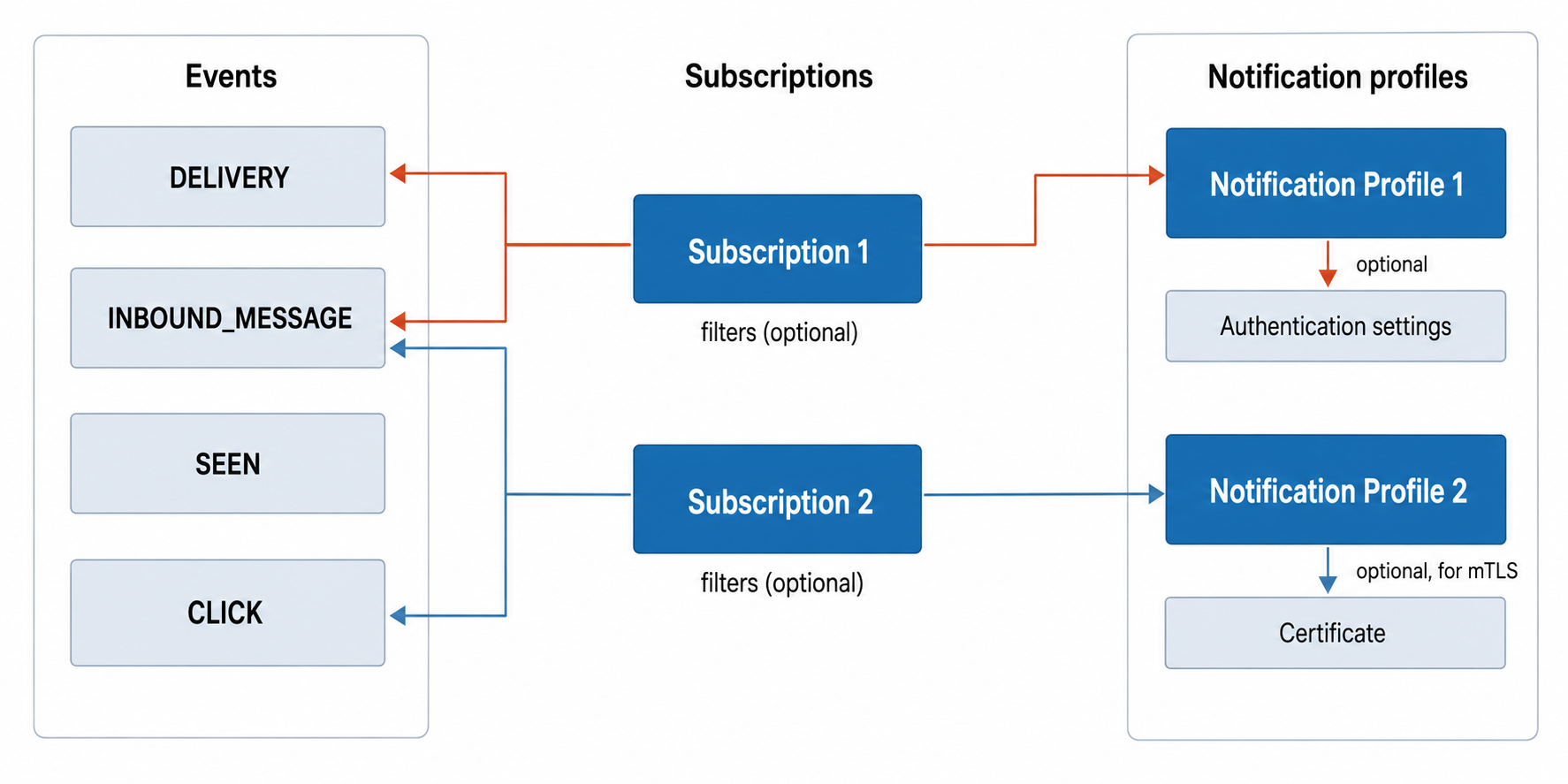
Subscriptions are the binding layer between two independent pools of resources: events and notification profiles.
- Events: Independent event types (
DELIVERY,INBOUND_MESSAGE,CLICK, and others) that exist at the channel level. A subscription selects one or more events to listen for. - Notification profiles: Reusable delivery configurations with a webhook URL and optional authentication settings or certificates. A subscription references exactly one profile.
- Subscriptions: Each subscription binds selected events to a notification profile, with optional filters to narrow which events trigger notifications. Multiple subscriptions can reference the same event types or share the same notification profile.
Deletion constraints [#deletion-constraints]
You can only delete a component if nothing else depends on it. Delete from the top of the hierarchy down: remove the dependent first (subscription), then the dependency (notification profile, authentication settings, certificate).
| Component | Can delete when | Blocked when |
|---|---|---|
| Subscription | Always. Subscriptions have no dependents. | Never blocked |
| Notification profile | Not referenced by any subscription | Still linked to one or more subscriptions |
| Authentication settings | Not referenced by any notification profile | Still linked to one or more profiles |
| Certificate | Not assigned to any notification profile | Still assigned to one or more profiles |
Deletion sequence example [#deletion-sequence]
To fully remove a subscription setup with all its components, delete top-down:
Delete the subscription
The notification profile, authentication settings, and certificate remain intact. They are no longer linked to this subscription but may still be used by others.
Delete the notification profile
Only possible if no other subscriptions reference it. Once deleted, the authentication settings and certificate become unlinked.
Delete the authentication settings
Only possible if no other notification profiles reference them.
Delete the certificate
Only possible if no other notification profiles reference it.
For component reuse patterns (shared vs independent setups), see Subscription components.
Best practices [#best-practices]

Plan component reuse
Decide upfront which components to share. This reduces configuration overhead and simplifies ongoing management.

Review dependencies before deleting
Before deleting a notification profile, check if other subscriptions depend on it. Reassign them to a different profile first.

Delete top-down
Delete subscriptions before profiles, profiles before authentication settings, and authentication settings before certificates.

Use clear naming
Name notification profiles and authentication settings descriptively so you can identify what each component does and what depends on it.
Understanding webhook subscriptions
Core concepts and how subscriptions work.
Manage webhook subscriptions
Create, update, and delete subscriptions.
Manage notification profiles
Configure webhook URLs and delivery settings.
Manage authentication settings
Secure your webhook endpoints with Basic, HMAC, or OAuth.
Manage certificates
Enable mutual TLS for endpoint authentication.