Dedicated and shared numbers
Every phone number (except short codes, which are always dedicated) can be either dedicated or shared. The ownership model determines how inbound messages are routed, which channels are supported, and what the number costs:
- Dedicated numbers: Assigned exclusively to your account. All inbound traffic routes directly to you without keyword configuration, and they are required for voice communication. They offer full control and guaranteed message access, but come at a higher cost.
- Shared numbers: Used by multiple customers. Inbound messages are routed based on keyword matching. They are more cost-effective, but support SMS only and do not support voice.
| Feature | Dedicated | Shared |
|---|---|---|
| Ownership | Exclusive to your account | Multiple customers on one number |
| Inbound routing | All traffic routes to you directly | Keyword-based matching |
| Channels | SMS, MMS, Voice | SMS only |
| Voice |  |  |
| Cost | Higher | Lower (shared fees) |
| Best for | Customer support, two-way, voice | Cost-conscious, SMS-only, high-volume |
Dedicated numbers
Dedicated numbers are assigned exclusively to your account. All inbound traffic routes directly to you without keyword configuration, giving you full control over message handling.
They are required for voice communication, as voice requires exclusive number ownership. Compared to shared numbers, they come at a higher cost but provide guaranteed message access and simpler routing.
Use dedicated numbers for:
- Customer support
- Two-way communication
- Voice use cases
Inbound routing is straightforward: all messages received on the number are delivered to your account, and any configured actions apply to all inbound traffic.
Shared numbers
Shared numbers are used by multiple customers to receive messages on the same phone number. Inbound messages are routed based on keyword matching, which identifies the intended recipient.
This model reduces costs, as number fees are shared among users, and allows flexible routing through keyword-based logic.
Shared numbers are suitable for:
- Cost-conscious operations
- SMS-only channels
- High-volume messaging
- Scenarios where they are the only available option in a given country
Configure inbound messages for numbers
When you receive inbound messages on a number, you configure how Infobip processes them using keywords and actions:
- Keywords: Filter inbound messages by matching specific words at the beginning of the message text. On shared numbers, keywords identify which customer receives the message. On dedicated numbers, keywords let you trigger different actions based on message content.
- Actions: Define how Infobip processes inbound messages. Forward to your system (HTTP, email, SMPP), store messages for retrieval, route to Conversations, or trigger auto-responses.
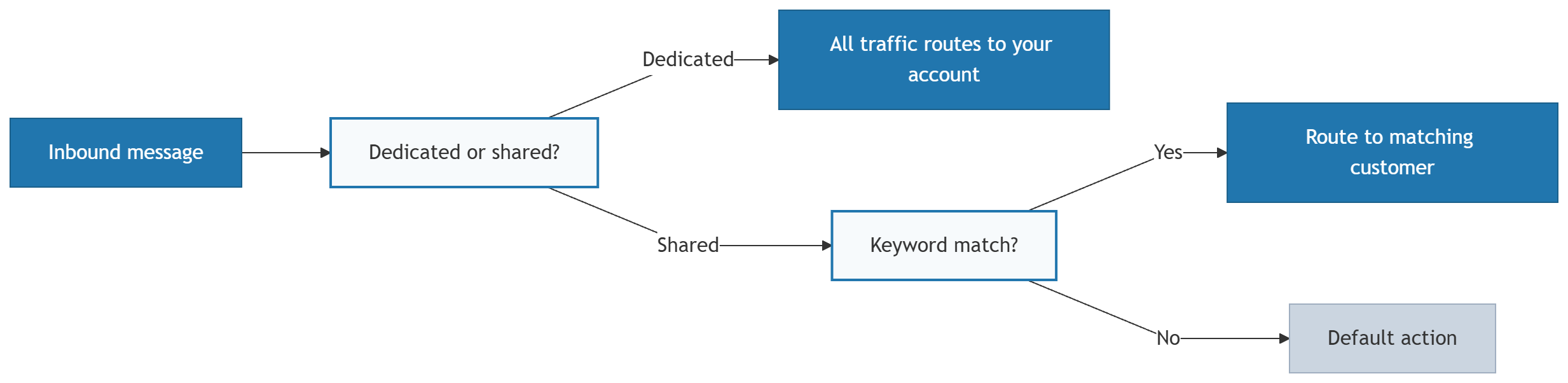
The following diagram shows how the system routes an inbound message depending on whether it arrives on a dedicated or shared number:

For complete setup instructions, all available actions, and advanced configuration options, see Configure inbound message handling.
Number types
Compare VLN, 10DLC, short code, and toll-free: formats, channels, costs, and setup timelines.
How to get a number
Buy a new number or import one you already own.
Configure inbound message handling
Set up actions, keywords, and routing rules for your number.